
Virtual Try-On for garment shops
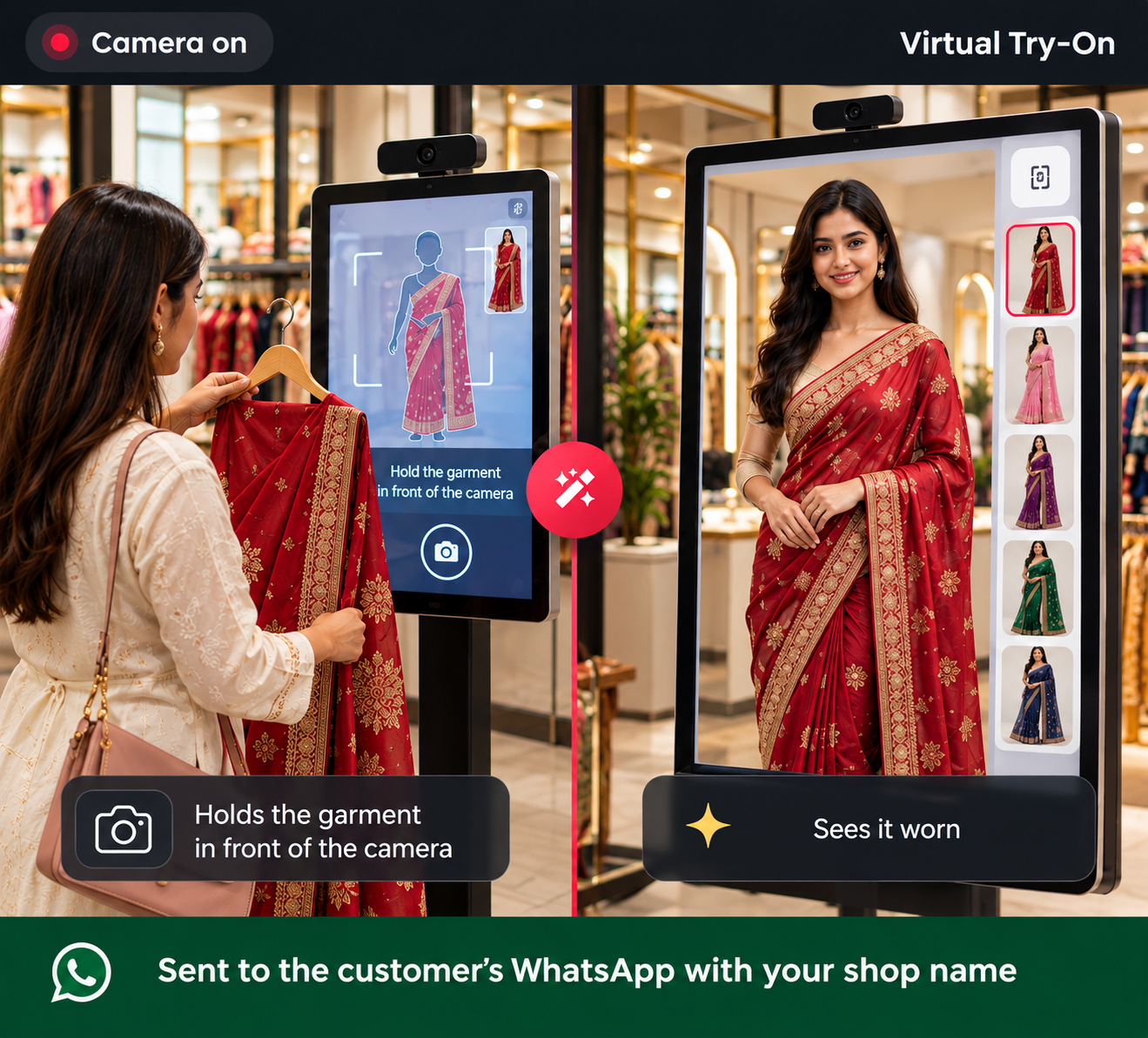
Your customer holds a garment in front of the camera. The photo is taken automatically and AI shows them wearing it — branded with your shop name and sent to their WhatsApp. No trial room, no app to install.
No need to buy TejOrder billing software — keep using your current billing.
How the account and plans work
Virtual Try-On is a separate TejOrder product. Your account, login and identity are shared; the purchase and subscription are independent.
| Topic | Decision |
|---|---|
| TejOrder account | Required (free) |
| Buying TejOrder billing software | Not required |
| Virtual Try-On | Can be bought on its own |
| Virtual Try-On plans | Separate from billing plans |
| Your existing billing software | Keep using it — nothing changes |
| New customer | Create a TejOrder account, then take a Virtual Try-On plan |
| Already using TejOrder billing | Same login — add a Try-On plan from Plans & Billing |
Start in 4 simple steps
Create TejOrder account
Free sign-up with your mobile number and shop details.
Choose a Try-On plan
Open Plans & Billing → Virtual Try-On and pick a plan or credit pack.
Subscribe & pay
Pay online. Credits are added to your Try-On wallet instantly.
Start using Try-On
Open Virtual Try-On on any screen with a camera in your shop.
How one try-on works
The screen guides the customer by voice in Hindi or English — your staff does not need any training.
Choose the garment type
Shirt, T-Shirt, Kurta, Saree, Pant and more. The camera starts after you choose.
Hold up the garment
The customer stands in front of the camera and shows the full garment, by hand or on a hanger.
Photo in 3 seconds
When everything is right, a 3-2-1 countdown starts and the photo is taken automatically.
See it & share
In under a minute the customer sees themselves wearing it. Download it or send it to their WhatsApp.
Built for real garment shops
Works on any screen
Phone, tablet, laptop or smart TV with a camera. Runs in the browser — nothing to install.
Voice guidance
Clear Hindi and English instructions tell the customer where to stand and how to hold the garment.
Your shop's branding
Every result image carries your shop name, so it advertises your shop wherever it is shared.
Send on WhatsApp
Enter the customer's mobile number and the photo goes from your business WhatsApp with a message.
Fair credits
1 credit = 1 try-on. If the AI fails or the garment is not clear, the credit comes back.
Customer privacy
Photos are used only for the try-on and are deleted automatically within 24 hours.
Separate plans, simple pricing
These plans are only for Virtual Try-On and are separate from TejOrder billing plans. All plans are valid for 1 year.
Starter
For small shops
- 8,333 try-ons
- ₹3 per try-on
- WhatsApp sharing with your shop name
- All garment types & voice guidance
Grow
For shops with regular Try-On use
- 20,000 try-ons
- ₹2 per try-on
- WhatsApp sharing with your shop name
- All garment types & voice guidance
Business
For big fashion stores
- 50,000 try-ons
- ₹1 per try-on
- WhatsApp sharing with your shop name
- All garment types & voice guidance
Prices include GST. Try-On credits are separate from billing credits and cannot be exchanged.
Questions shop owners ask
Do I have to buy TejOrder billing software to use Virtual Try-On?
No. You only need a free TejOrder account. Virtual Try-On has its own plans, so you can keep using your existing billing software.
Are Virtual Try-On plans separate from TejOrder billing plans?
Yes. Try-On plans and credits are a separate subscription. Your login and account are the same, but the two products are bought and renewed independently.
What does the shop need?
A phone, tablet, laptop or smart TV with a camera, a web browser and an internet connection. No app to install and no special hardware.
How long does one try-on take?
The photo is taken automatically in about 3 seconds. The AI result is usually ready in under a minute.
Which garments are supported?
Shirt, T-Shirt, Kurta, Saree, Top, Pant, Jacket, Blazer, Sherwani and Lehenga. You can switch off the types your shop does not sell.
Is a credit used if the try-on fails?
No. One credit is one try-on. If the AI cannot make the image or the garment is not clearly visible, the credit is returned.
What happens to customer photos?
Photos are used only to make the try-on and are deleted automatically within 24 hours.
I already use TejOrder billing. How do I add Try-On?
Log in with the same account, open Plans & Billing → Virtual Try-On and buy a Try-On plan or credit pack. Your billing plan is not affected.
Give your customers a trial room on the screen
Create your free TejOrder account, choose a Virtual Try-On plan and start in minutes — no billing software purchase needed.
Create free account