
- If you are GST-registered, add your GSTIN in TejOrder (Settings → Business Settings → GST Registrations) and link it to each branch in that state. Bills of linked branches get GST; others are made without GST.
- One GSTIN belongs to one state. Shops in the same state share it; a shop in another state needs its own registration.
- Composition dealers and unregistered businesses do not charge GST on their bills.
Do you need GST registration?
You must register once your total turnover in a financial year crosses the limit:
- Selling only goods: above ₹40 lakh in most states (₹20 lakh in some states, mainly in the North-East).
- Selling services: above ₹20 lakh (₹10 lakh in some states).
- Some businesses must register from the first sale, whatever the turnover — for example when selling goods to another state.
Regular, Composition or Unregistered?
Regular GST
- You charge GST on your bills (a tax invoice).
- You can claim input tax credit on the GST you paid on purchases.
- You can sell to other states.
Composition scheme
- For smaller businesses — turnover up to ₹1.5 crore for goods (₹75 lakh in some states), ₹50 lakh for services.
- You pay tax at a small fixed rate on your turnover, but you cannot collect GST from customers or claim input tax credit.
- You issue a bill of supply, and you cannot sell goods to other states.
Not registered
- Your bills have no GST, and you cannot claim input tax credit.
One GSTIN per state, many branches
A GSTIN is tied to a state. All your shops and godowns in that state can work under the same GSTIN. If you open a branch in another state, that state needs its own GST registration. In TejOrder you add one registration for each state and link every branch to the registration of its state.
Set up GST in TejOrder (about 5 minutes)
-
Open GST Registrations
Open Settings from the menu, tap Business Settings, then GST Registrations on the left.
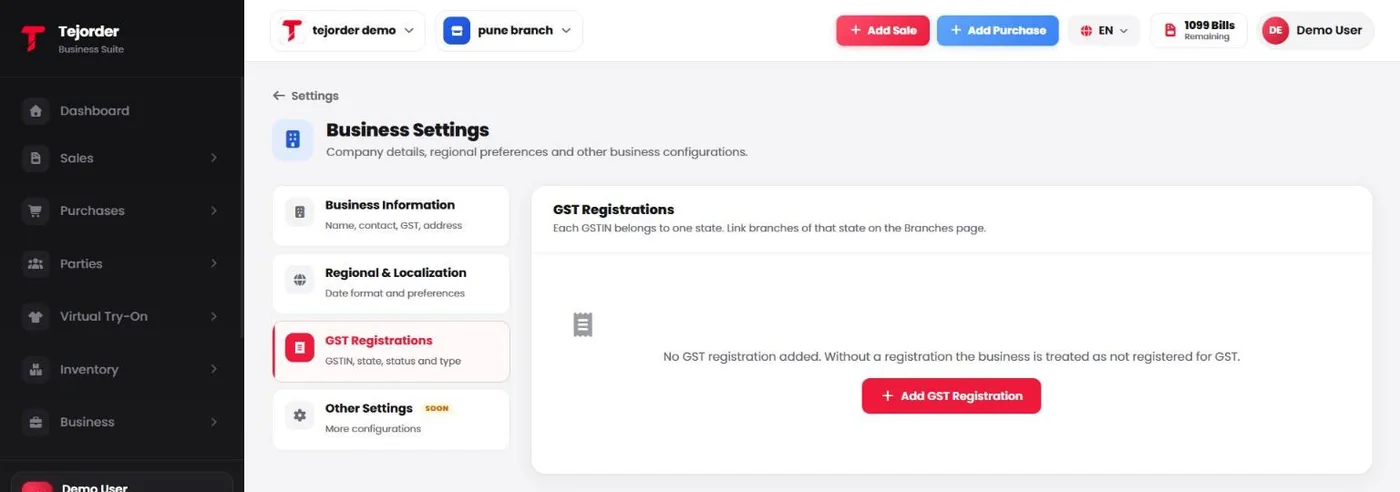
Settings → Business Settings → GST Registrations. - Add your GSTIN Tap Add GST Registration, enter your GSTIN and its details, and save. Add one registration for each state you have a GSTIN in.
-
Link it to your branches
Open Business → Branches. The GST column shows each branch's registration. Use the ⋮ menu next to a branch to edit it and link the registration of its state.
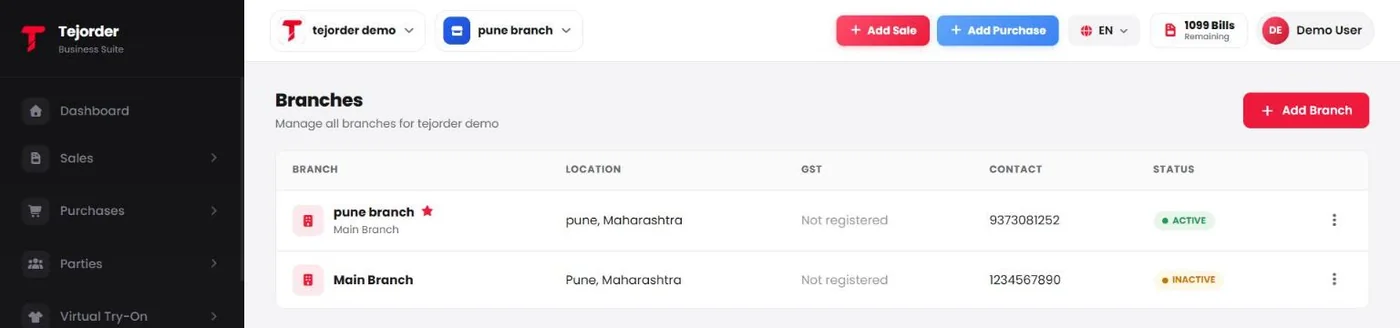
Business → Branches — GST shows Not registered until a registration is linked. - Check your items Make sure each item has the right HSN code and GST rate in Inventory → Items. The bill uses these.
Common questions
I have two shops in the same state. Do I need two GSTINs?
Usually no. One GSTIN can cover all your places of business in a state — the second shop is added as an additional place of business. In TejOrder, link the same registration to both branches.
I am a composition dealer. Will TejOrder add GST to my bills?
No. A composition dealer cannot collect GST from customers, so TejOrder does not add GST on those bills.
Does a TejOrder plan cost more with GST?
No. Every plan includes both GST and non-GST invoices.
Next: what a GST invoice must show →
Make your first GST bill today
Create a free TejOrder account — billing, stock, payments and reports in English, Hindi and Marathi, on any device.