
Short answer
- Record every supplier bill the day it arrives, with the supplier's bill number. Your stock goes up and the supplier's balance is updated.
- If you are a regular GST dealer, the GST on purchases can be set off against the GST on your sales (input tax credit) — if you have a valid tax invoice, received the goods, and the bill shows in your GSTR-2B.
- Pay the supplier within 180 days of the bill date, or the credit has to be reversed until you pay.
Why every purchase bill matters
- Stock: your stock is right only when every purchase is entered.
- Supplier dues: you always know how much you owe each supplier.
- Tax: as a regular GST dealer, the GST you paid on purchases reduces the GST you pay to the government.
What is input tax credit? A simple example
- You buy goods for ₹10,000 + 18% GST = ₹1,800 GST paid to the supplier.
- You sell them for ₹15,000 + 18% GST = ₹2,700 GST collected from customers.
- You pay the government only the difference: ₹2,700 − ₹1,800 = ₹900.
When can you claim it?
- You hold a valid tax invoice from a GST-registered supplier, with your GSTIN on it.
- You have received the goods or services.
- The supplier has reported the bill, so it shows in your GSTR-2B.
- The supplier has paid the tax, and you have filed your own return.
- The purchase is not a blocked item — for example, things for personal use do not qualify.
Two time limits
- 180 days: pay the supplier (value + tax) within 180 days of the bill date. If not, reverse the credit with interest; you can take it again once you pay.
- Last date: the credit for a financial year must be claimed by 30 November of the next year, or when you file the annual return, whichever is earlier.
Input tax credit is claimed in your GST return, which you or your CA file. This guide is not tax advice.
Record a purchase bill in TejOrder
-
Open Purchase Bill
Open Purchases → Purchase Bill. You see all bills with paid, partly paid and unpaid totals. Tap Add Purchase.
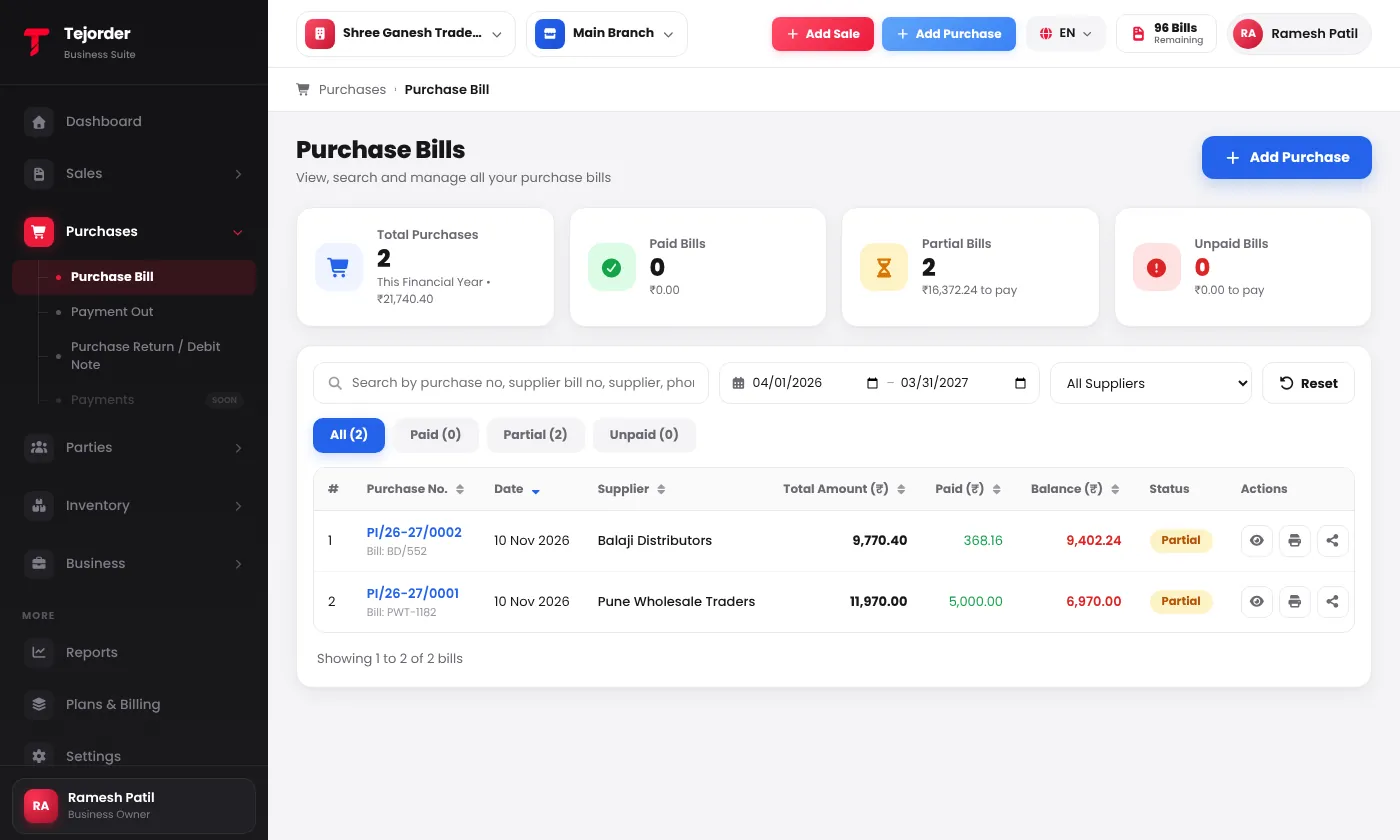
Purchases → Purchase Bill — every bill with its supplier bill number, paid amount and balance. - Pick the supplier and type their bill number Search the supplier — their phone, address and balance fill in. Type the Supplier Bill No. exactly as printed on their bill.
-
Add the items
Search each item. The purchase price, unit, HSN and GST come from the item — change the quantity and price to match the supplier's bill.
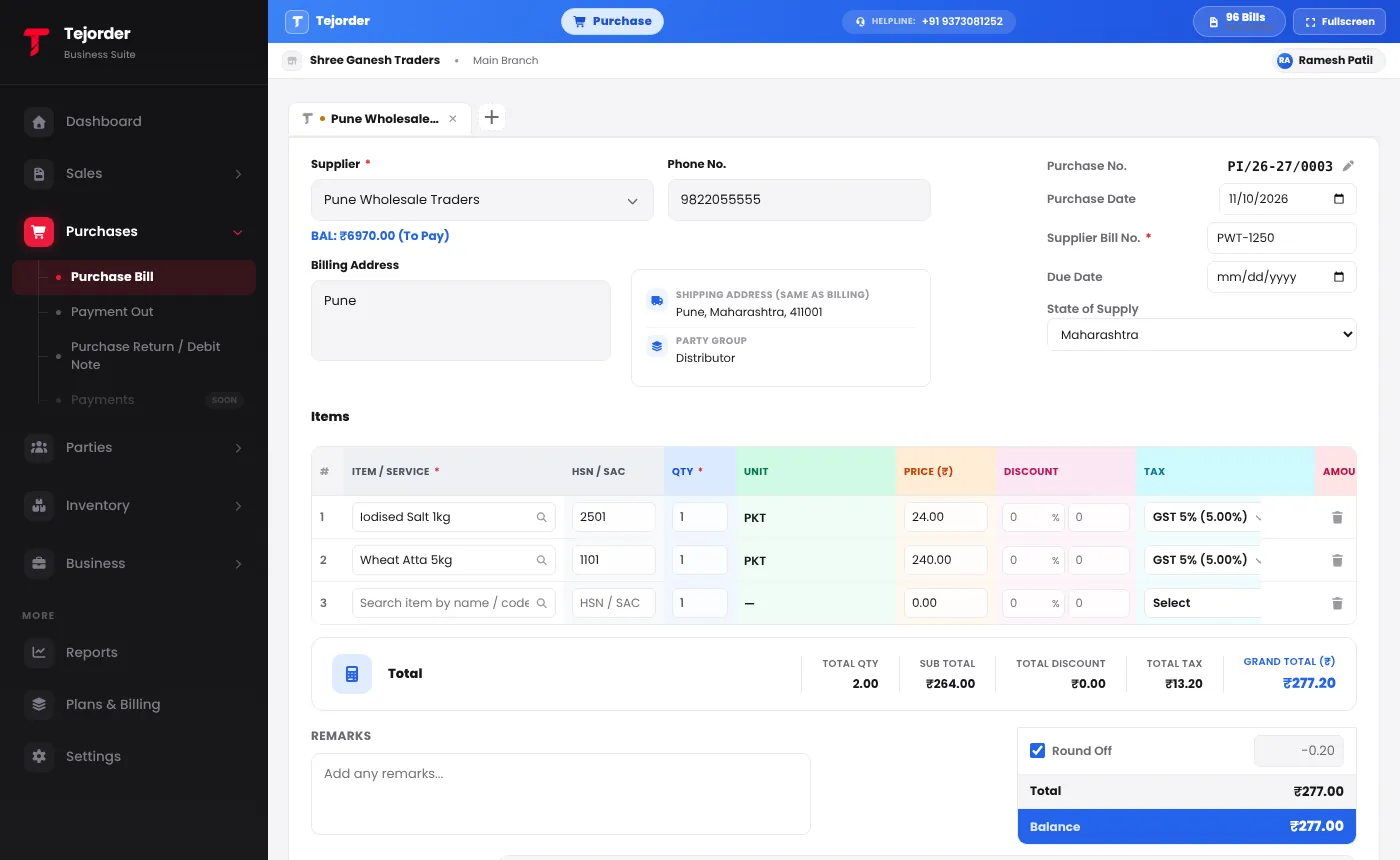
A purchase bill with the supplier, Supplier Bill No. and items filled in. - Enter any payment and save If you paid now, type it in the Payment section; leave it empty for a credit purchase. Tap Save Bill (F10). Pay later from Purchases → Payment Out.
Good habits
- Check that your GSTIN and the GST amounts on the supplier's bill are correct before you enter it.
- Keep the paper or PDF bill — you may need it to support your credit.
- Once a month, match your purchase bills with your GSTR-2B and ask suppliers about any bill that is missing.
- Watch bills older than 150 days that are still unpaid, so the 180-day limit does not catch you.
Common questions
Why does TejOrder ask for the Supplier Bill No.?
It is the number printed on your supplier's bill. It lets you match your entry with the supplier's bill and with what appears in your GSTR-2B.
Can a composition dealer claim input tax credit?
No. Under the composition scheme you cannot claim input tax credit. Still record your purchase bills — your stock and supplier dues depend on them.
Does a purchase bill use a bill from my TejOrder plan?
No. Purchase bills do not use bills from your plan. Only posting a sales invoice does.
Make your first GST bill today
Create a free TejOrder account — billing, stock, payments and reports in English, Hindi and Marathi, on any device.